Sandoz
Sandoz is a global leader in the production and distribution of generic and biosimilar medicines. Sandoz has its roots in Switzerland, where it was founded in 1886 by Alfred Kern and Edouard Sandoz. Initially, the company was engaged in the production of dyes, and then expanded its business to pharmaceuticals. Its achievements include the discovery and market introduction of substances such as antipyrine, saccharin, ergotamine, lysergic acid and calcium. In 1996, Sandoz merged with another Swiss pharmaceutical company, Ciba-Geigy, to form Novartis. Sandoz then became one of the divisions of Novartis, specializing in generic and biosimilar drugs. Sandoz offers a wide range of medicines used in various therapeutic areas, such as oncology, cardiology, neurology, dermatology and endocrinology. Sandoz is also a pioneer in biosimilars, which are biologics similar to the original biologics that have lost patent protection. Sandoz operates in more than 160 countries around the world and employs approximately 28,000 people. In 2022, Sandoz achieved revenue of $9.249 billion and operating profit of $1.448 billion.


The Challenge
The project involved designing a UX (wireframe) for three Sandoz medical applications. The first is Sandoz Rheumatism - a web-based application for doctors, supporting the selection of rheumatism therapy. The second is Sandoz Learn, an app for the global south market that allows doctors to record short videos and attach them to prescriptions for illiterate patients. These videos patients can play on any phone in a web browser. The third and most advanced is Sandoz Health. The doctor “prescribes” it to the patient by generating a code and asks the patient to send it by SMS to the specified number. Thanks to her, the patient monitors his health. This is possible with the help of SMS, or optionally can download a mobile application and get the fullness of functionality. The application offers the patient personalized tutorials about his illness in the form of “stories”. Another function is the health diary - the patient can enter into it measurements of sugar level, pressure, pulse, weight, temperature or saturation. You can enter the results manually or connect the measuring devices wirelessly. The patient may also receive medication reminders. In addition, the application allows you to make appointments or teleconsultations, assess symptoms thanks to AI - pre-medical history, store medical records by taking a photo of it or connecting an ICP account or diagnostic laboratory. During a medical consultation, the patient can share with the doctor all the information from the application by entering a code - a method similar to BLIK.


Sandoz Rheumatism
Survey

The survey is designed to help the doctor in the selection of rheumatism therapy. The survey consists of three parts: Severity, Treatment and Therapy. In the Severity section, the doctor evaluates the intensity of the patient's symptoms on a scale from mild to severe. In the Treatment section, the doctor determines the stage of treatment for the patient, that is, whether it is the initial treatment, after the failure of the initial treatment or after the failure of the TNF inhibitor. In the Therapy section, the doctor chooses the type of therapy, that is, whether it is monotherapy or combination therapy. Based on the doctor's response, the app generates a treatment recommendation that is consistent with clinical guidelines and based on clinical trial data.
Findings

The doctor can refer to the results of clinical studies on various drugs used to treat rheumatism. These results are divided into groups of drugs with similar mechanisms of action, and into clinical guidelines based on the best scientific evidence. Depending on the option chosen, the doctor can see a list of substances that have been tested for efficacy, safety and immunogenicity compared to the reference drug. For example, in the molecule section, the doctor can select CDMARDs (conventional disease-modifying anti-rheumatic drugs), Biological DMARDs (biological drugs that modify the course of the disease), Targeted synthetic DMARDs, etc. In the guideline section, the doctor can choose NICE — TA715 (National Institute for Health and Care Excellence — Technology Appraisal 715), NICE — TA715 (Technology Appraisal 715) 375 (National Institute for Health and Care Excellence — Technology Appraisal 375), etc. After expanding the section, the doctor can see the names of the substances, such as Adalimumab, Etanercept, Infliximab, Abatacept, etc.
Description of the drug and recommendations

The app is a useful tool for doctors who want to see how a given drug can be used in different types of therapies. The application shows not only the main use of the drug, but also its alternative or additional uses in combination therapy. In this case, the application suggests what other drug can be used together with the selected drug, and displays its brief description. The application also facilitates access to detailed information about the drug, such as indications, dosage, interactions, side effects and contraindications. It is enough to click on the name of the active substance to go to the description of therapy with a particular drug. This description contains not only basic information about the drug, but also links to scientific sources and clinical recommendations. For example, clicking on Abatacept takes the doctor to a description of therapy with abatacept (Orencia), which is a biologic disease-modifying drug (Biological DMARDs) used to treat rheumatoid arthritis (RA), polyarthritic juvenile idiopathic arthritis (PJIa), and psoriatic arthritis (PsA). In this description, the doctor can find information about the mechanism of action of abatacept, its efficacy and safety, as well as how to administer and monitor treatment.
Learn Sandoz
Recording a movie
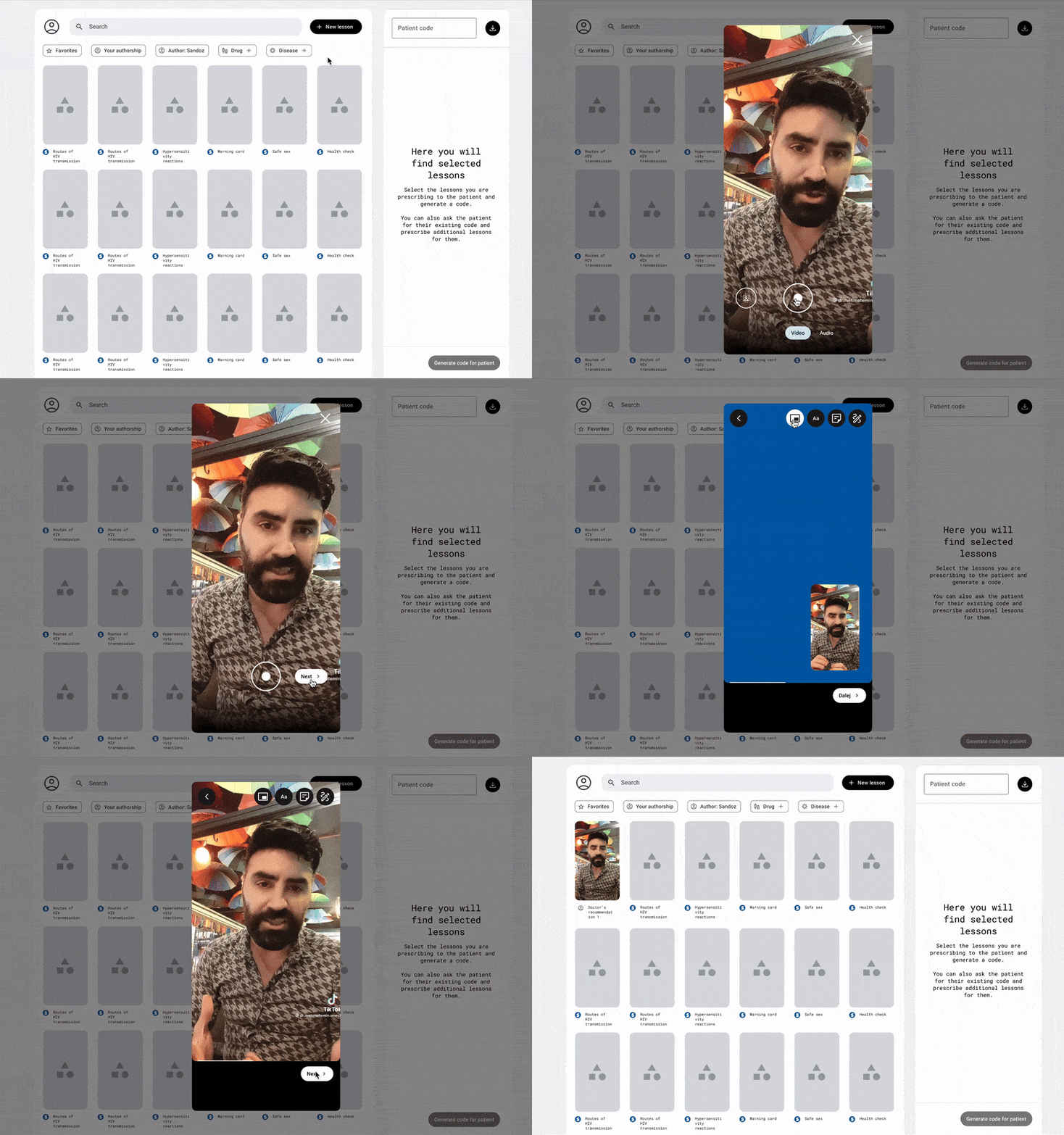
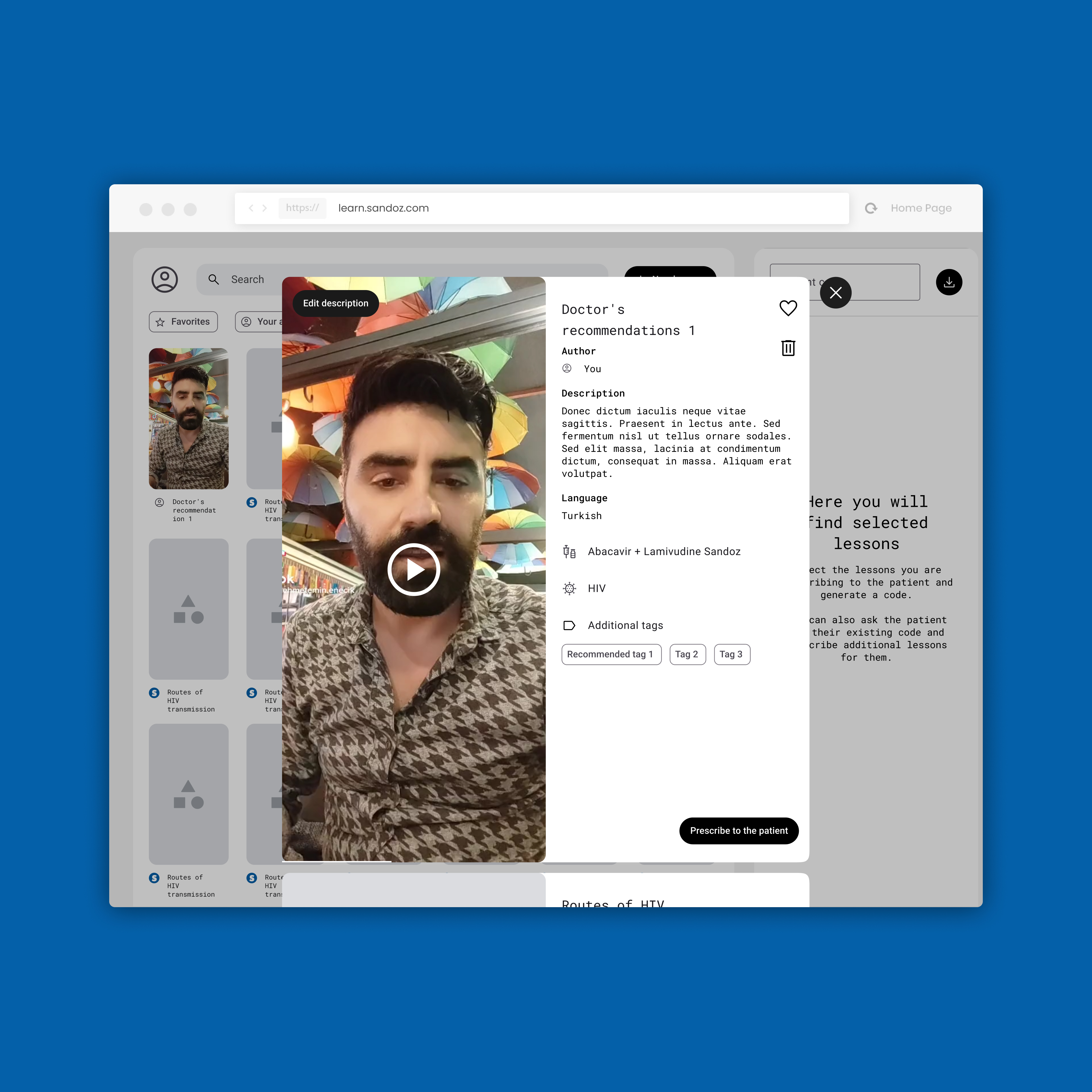
The Sandoz Learn app is an innovative solution for doctors who want to better communicate with patients who are illiterate or have difficulty reading. The application allows doctors to record short videos in which they explain to patients how to take medications, symptoms of illness, dietary recommendations or other important information. These videos can be attached to patient prescriptions that are generated by the app in the form of a QR code. Patients can read the QR code using any phone with a web browser and play the doctor's video. The Sandoz Learn app has a simple and intuitive interface that makes it easy for doctors to record and edit videos. The doctor can use the film fullscreen or minimize it to the lower right corner, and fill the main space of the recording with a drawing or illustrations that will help the patient understand the content of the video. The doctor can also give the video a title and description, as well as tag it in terms of drug or disease, which will make it easier to search and sort the videos. After that, the doctor can save the video for later or immediately “prescribe” it to the patient.
Viewing videos

The doctor can choose from the materials he has recorded, as well as a database of materials provided by Sandoz, which includes video about various drugs and diseases. Your doctor can view videos from the list view, or from the movie view. From the list view, the doctor can see the titles, descriptions and tags of the videos, as well as their length and date of recording. The doctor can group mark the videos that interest him. The selected videos can then be played, edited, deleted, or attached to the prescription.
Filtering and search engine

The doctor can use a variety of criteria to find a video that suits his needs. The doctor can filter the video by favorites, authorship, drug name, or disease name. Favorite videos are those that the doctor marked as such by clicking on the asterisk. Authorship means whether the video was recorded by a doctor by Sandoz or shared by another doctor. It is also possible to filter by the specific name of the drug or by the name of the disease. The doctor can also search for videos by keyword by typing them into the search box.
Share a set of videos with the patient

After selecting the appropriate video materials, the doctor generates a QR code for the patient, which is a unique set of videos. The QR code can be printed and attached to the prescription. The patient can scan the QR code using any phone with a web browser and play back materials from the doctor.
Web patient application

After scanning the QR code, the patient is asked to enable notifications to receive reminders of educational videos that are tailored to their illness and medication. After that, the patient can already view the “prescribed” materials for him in both audio and video form.
Sandoz Health
SMS/MMS/RCS Version

The application has two versions: basic and full. The basic version works via SMS/MMS/RCS, that is, text and multimedia messages. To use the basic version, the patient must register in the program by sending an SMS with a code generated by the doctor. This code is unique to each patient and contains information about his illness, medications and recommendations. After registering in the program, the patient receives regular messages from artificial intelligence, which asks him about the state of health and reminds him to take medications. Artificial intelligence analyzes the patient's responses and adapts the content of the message to his needs and progress. Artificial intelligence can also send tutorials and advice to the patient that are designed to improve their knowledge and attitude towards health. The patient in one of the messages also receives a link to download the full version of the application.
Intuitive installation

The Sandoz Health app also has a full version that offers more features and possibilities to the patient. To use the full version, the patient must download and install the application on his phone. The installation process is very intuitive and simple. The patient receives in SMS a magic link, which takes him to a page designed to recognize the operating system of his phone. After that, the patient is immediately transferred to the appropriate store, that is, Google Play for Android or App Store for iOS. The store uses the services App Links for Android and Universal Links for iOS, which allow you to transfer the token to the installed application. This token is a unique identifier for the patient and his program. Thanks to this, the patient is only asked to enter a phone number and fill in a one-time token for the password. At the next login, the patient must additionally enter the SMS code that he receives to his number (the code can also be entered automatically thanks to the SMS Retriever API for Android and AutoFill SMS Verification Code for iOS services.
Educational stories

These are short, interactive and engaging materials that are designed to increase the patient's knowledge of their disease and medications. Stories are tailored to the user based on the doctor-indicated illness and prescribed medications. The patient can view the stories at any time, or receive them as part of an educational program. Stories contain information about the causes, symptoms, treatment, prevention and management of the disease, as well as the action, dosage, side effects and contraindications of drugs. Stories are divided into short segments that the patient can scroll, repeat or skip. Stories also include questions and exercises that test the patient's understanding and memory. Stories are developed by medical and pedagogical experts, as well as based on the best scientific evidence.
Logbook of measurements

The Sandoz Health app also has a measurement log function that allows the patient to enter and track various health parameters such as sugar level, pressure, pulse, weight, temperature or saturation. The patient can enter the results manually by entering them in the appropriate fields, or wirelessly connect measurement devices that automatically transmit data to the application. The application displays the results in the form of tables, graphs or statistics that help the patient assess the state of their health and the progress of treatment. The app also compares the patient's results with medical standards and recommendations, and alerts the patient if the results are abnormal or dangerous.
Medication Reminder

The Sandoz Health app also has a medication reminder feature that helps the patient remember to take their medication regularly. This function is enabled by default by the doctor when generating the code that he passes to the patient. The doctor can set the time and frequency of the reminder, as well as the content of the message that will be sent to the patient. The patient receives a reminder in the form of SMS, MMS, RCS or notification from the application, depending on which version he uses. The patient can confirm that he took the drug by clicking on the link or button in the message. The patient can also turn off or change the reminder time if they wish. To do this, he needs to enter the application settings or send the appropriate SMS command.
Making appointments

The patient can choose a doctor, specialty, date, time and type of appointment, that is, stationary or online. The patient can also search for a doctor by name, location or opinion. After choosing a doctor and appointment, the patient receives a confirmation of the appointment, which includes the doctor's contact details, the office address or a link to the online appointment, as well as information about the cost and method of payment. The patient can also cancel or change the appointment if they wish. The Sandoz Health app reminds the patient of an upcoming appointment by sending them a message from the app or SMS 24 hours and one hour before the appointment.
Symptom assessment

This feature is based on the Infermedica API, which is an advanced artificial intelligence system that analyzes symptoms and suggests possible diagnoses. To use the function, the patient must enter the “Symptom Assessment” tab and enter or select from the list of symptoms that affect him. The AI then asks the patient additional questions to get more details and rule out some options. Questions may be about duration, severity, location, frequency, relationship to other factors, or accompanying symptoms. After collecting enough information, artificial intelligence presents the patient with a list of possible diseases that may be responsible for his symptoms. This list is sorted by probability and contains a brief description of each disease, as well as information on whether to consult a doctor and how urgently. If the case does not seem urgent, the application suggests to the patient what he can do to relieve symptoms or prevent the condition from getting worse. The application saves the results of the symptom assessment in the patient's health diary, where they can later be reviewed or shared with the doctor. The doctor during the visit can study the results of the pre-medical survey and confirm or change the diagnosis, as well as suggest appropriate treatment.
Medical Record Scanner

The application automatically recognizes the content of documents, converts them into PDF files. The application saves scanned documents in a journal.
Import of medical records
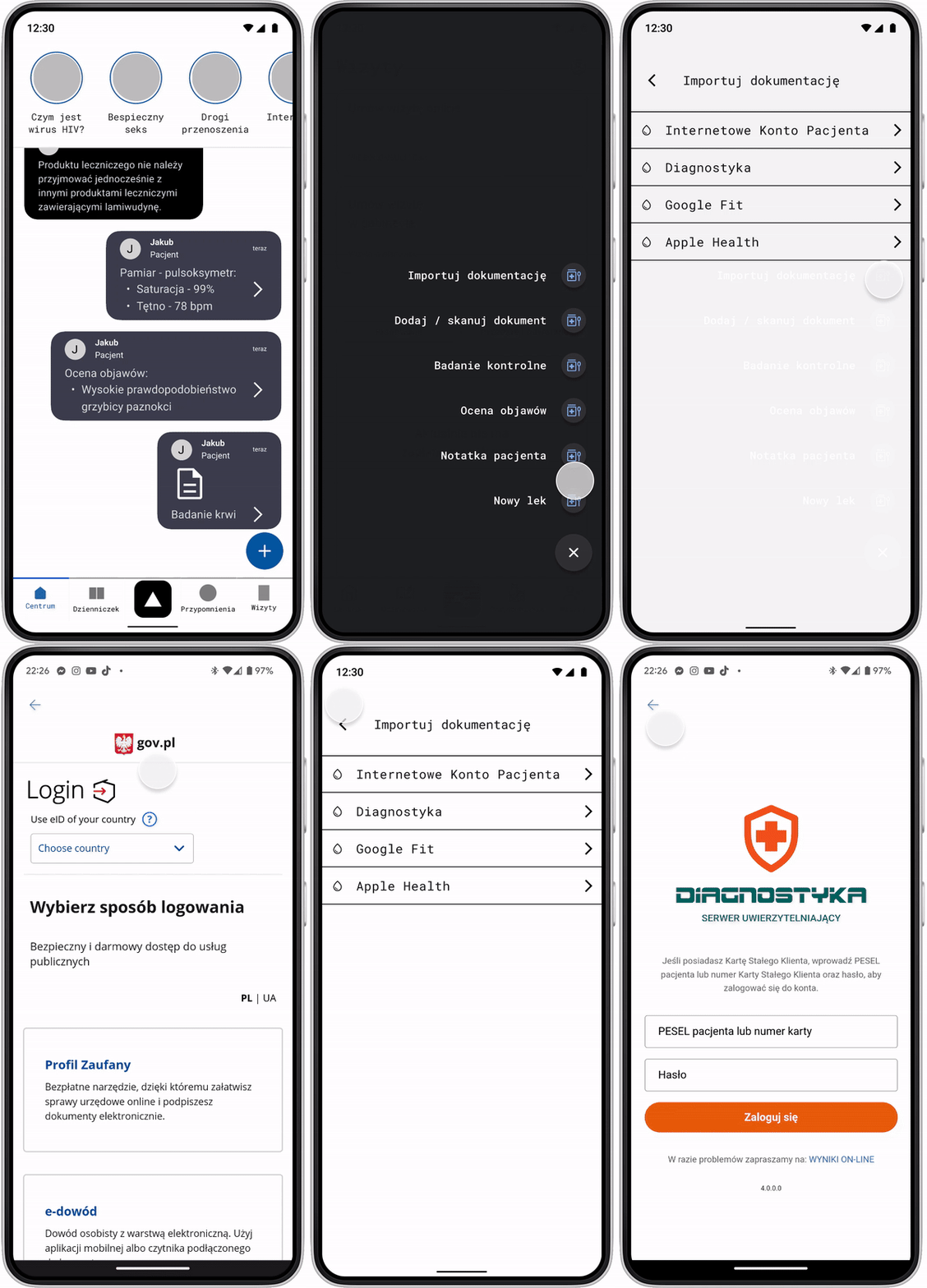
This feature allows the patient to synchronize their health data with various e-health sources and services. The patient can choose which services they want to connect to and log in to their accounts. Once connected, the patient can receive, send and update their health data, such as e-prescriptions, e-referrals, test results, measurements, physical activity or health goals.
Sharing medical data with your doctor
.gif)
This feature allows the patient to quickly and securely show the doctor log data and documents such as prescriptions, referrals, test results or certificates. The patient is given a six-digit code, which is valid for 60 seconds. The patient must provide this code to the doctor, who enters it in his web application. After entering the code, the doctor accesses the patient's medical records, which are streamed to the doctor's computer screen. The patient can see which documents are being shared, as well as interrupt the session at any time if he wishes. This feature uses the technology of streaming data from phone to computer -WebRTC. It is a technology that allows peer-to-peer communication between web browsers, without the need to install additional plugins or applications.
Team
Head of Design: Iwo Rzepiela
UX: Jakub Nowak